Chalk Style Editable Text Effect for Adobe Illustrator
If you’ve ever tried to recreate the look of chalk on a blackboard using digital tools, you know it can be tricky. Standard fonts often look too clean, and spending hours adding texture manually isn’t always practical. That’s where the Chalk Style Editable Text Effect comes in. This is not a font you install but a pre-built effect for Adobe Illustrator, delivered as an EPS CS6 file. It gives any text the soft, gritty appearance of real chalk on a rough surface. Everything stays fully editable, so you can swap words, adjust colors, or scale the design without losing the handmade effect. It’s a simple way to add warmth and character to your projects, whether you’re a beginner or a seasoned designer.
Understanding the Basics of This Text Effect
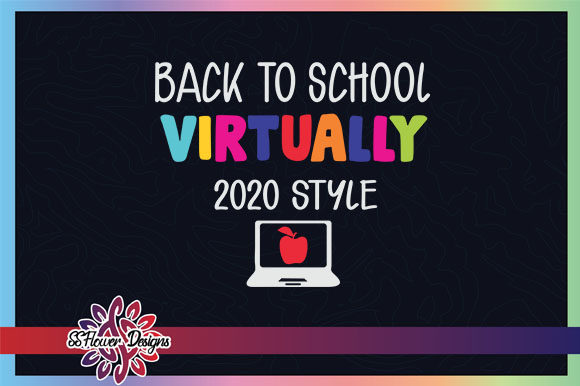
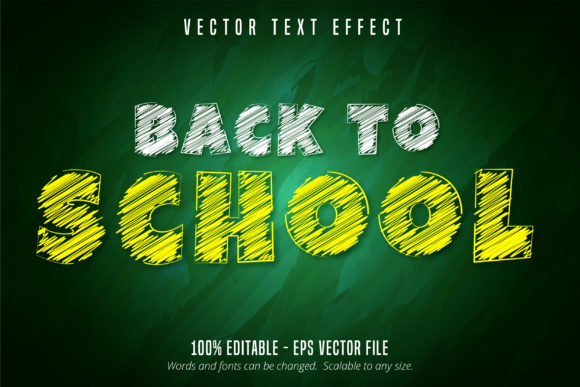
The core idea behind the Chalk Style Editable Text Effect is convenience. Instead of building a chalk texture from scratch, you get a ready-made template that handles the heavy lifting. The effect is saved in EPS format, which means it works with Adobe Illustrator CS6 and later versions. Because it’s vector-based, you can resize it to any dimension—from a tiny label to a large poster—without any loss of quality. The effect includes a sample "Back to School" text, but you can edit it to display any word or phrase. Every stroke, texture, and shading remains adjustable, giving you control over the final look.
For those new to graphic design, this approach is especially helpful. You don’t need to know how to create custom brushes or apply complex filters. Simply open the file, select the text layer, and type your own message. The chalk texture stays in place, so the result looks natural and consistent. More experienced users can dive deeper by tweaking the effect’s settings, such as adjusting the opacity or blending modes, to fine-tune the appearance.
Why This Effect Appeals to a Wide Audience
One of the main reasons people reach for a chalk style effect is the emotional connection it creates. Chalkboard designs often remind us of classrooms, cafés, and handmade signs. They feel approachable and authentic. The Chalk Style Editable Text Effect captures that sentiment without requiring real chalk or a physical board. This makes it valuable for a range of users, each with their own goals.
For Educators and Hobbyists
Teachers preparing classroom materials can use this effect to create engaging worksheets, bulletin board headers, or labels. The Back to School sample text is a natural starting point, but you can adapt it for subjects like math, science, or language arts. Hobbyists working on scrapbooks, invitations, or home decor also benefit from the textured, hand-drawn vibe. Because the effect is scalable, it works for both small craft projects and larger displays.
For Small Business Owners and Marketers
Entrepreneurs often need eye-catching visuals for social media, flyers, or menu boards. The chalk style stands out in a sea of polished digital graphics. A coffee shop owner might use it for daily specials, while a boutique could promote a seasonal sale. Marketers can repurpose the effect for email headers, blog graphics, or promotional videos. The editable nature means you can change text quickly for different campaigns without starting over.
For Freelancers and Creative Professionals
Freelancers and designers appreciate tools that save time without sacrificing quality. The Chalk Style Editable Text Effect fits into that category. It offers a unique look that clients often request, especially for brand identities that need a rustic or artisanal feel. Instead of spending hours simulating chalk texture, you can deliver a polished result in minutes. The EPS compatibility also simplifies collaboration, as the file works smoothly across different systems.
Real-World Applications Across Contexts
Beyond the obvious classroom and café settings, this effect finds use in many unexpected places. Consider a charity event needing a warm invitation, or a musician designing a poster for an acoustic show. The chalk texture adds a handcrafted element that feels personal and human. It works equally well in digital formats, like social media posts, and in print, such as postcards or banners. Because the effect is not a font, you are not limited to specific typefaces—you can combine it with other design elements freely.
Another practical application is in video production. Titles or lower thirds with a chalk style can introduce educational content or vlogs with a nostalgic touch. The scalability ensures that even if you need the text large for a full-screen graphic, the texture remains crisp. Similarly, web designers can use this effect for call-to-action buttons or headings that need to convey creativity and authenticity.
Getting Started: A Beginner-Friendly Workflow
If you’re curious about using the Chalk Style Editable Text Effect, the process is straightforward. First, ensure you have Adobe Illustrator CS6 or a newer version installed. Open the EPS file, and you will see the sample text with the effect already applied. To customize, use the Selection tool to highlight the text layer. Double-click to edit the text, then type your desired word or phrase. The effect automatically adapts to the new content. You can also change the color by selecting the text and adjusting the fill in the toolbar. Keep in mind that the texture is part of the effect, so simple color changes won’t remove the chalky look.
For those wanting to explore further, try resizing the text. Because the file is vector, you can drag the bounding box to make the text larger or smaller without pixelation. If you need to rotate or skew the text, the effect follows along smoothly. The file also contains layers that you can hide or modify, such as background textures or additional graphic elements. This flexibility makes it useful for both quick edits and more elaborate compositions.
Important Considerations Before Choosing This Effect
While the Chalk Style Editable Text Effect is versatile, it helps to keep a few things in mind. First, it is built specifically for Adobe Illustrator. If you primarily use other software like Photoshop, InDesign, or Canva, you may need to convert the file or accept some limitations. For example, opening the EPS in a different program might flatten the effect or lose editability. Second, although the effect is called "editable," advanced customizations—like changing the texture pattern or brush style—require some comfort with Illustrator’s Appearance panel and graphic styles. Beginners can still change text and colors easily, but deeper tweaks may involve a learning curve.
Another point to consider is the purpose of your project. The chalk style works best when you want a natural, imperfect look. It may not suit designs that require ultra-clean lines or corporate minimalism. However, for themes like education, back to school, rustic decor, or creative branding, it fits beautifully. Finally, because the effect is a single file, you may need multiple copies if you plan to use it across many projects. Keeping a master template is a good habit, so you can always start fresh.
Overall, the Chalk Style Editable Text Effect offers a practical bridge between digital convenience and analog charm. It saves time, encourages creativity, and adapts to a wide variety of uses. Whether you’re a teacher preparing next week’s lesson, a marketer planning a campaign, or a hobbyist adding personal touches to your home, this tool provides a reliable way to achieve that chalkboard aesthetic. By understanding its strengths and limitations, you can make the most of what it offers and create designs that feel both polished and handmade.