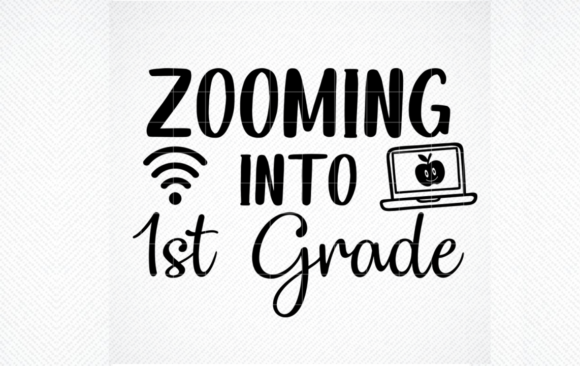
Zooming into 1st Grade Cut File: A Back to School Asset
The back-to-school season carries a unique energy. For educators, it is a marathon of preparation. For parents, it is a mix of pride and logistics. For creators and small business owners, it is a critical sales window. Finding resources that serve all these needs efficiently can be challenging. The "Zooming into 1st Grade and Back to School Zoom Style Grades K-6TH" cut file set is one such resource. It provides a flexible, scalable design that adapts to very different projects. Understanding what this file offers, and how it fits different workflows, is the key to getting real value from it.
What the Zooming into 1st Grade Set Includes
This is a digital cut file package built around a modern back-to-school theme. The design uses the familiar language of "zooming" into a new grade, which resonates with today's tech-connected culture. The set provides four standard file formats, ensuring broad compatibility across software and machines.
- SVG File: The standard format for electronic cutting machines like Cricut and Silhouette. It allows for clean, precise cuts on materials like vinyl, cardstock, and iron-on.
- PNG File: A high-resolution raster image with a transparent background. Ideal for digital mockups, print-and-cut projects, or simple iron-on transfers using a home printer.
- EPS File: A professional vector format widely used in graphic design software like Adobe Illustrator and CorelDRAW. Offers deep editing capabilities for advanced users.
- DXF File: A format often used for CAD programs and older or specific cutting machine software, providing another layer of technical compatibility.
Because the design is a vector file, it can be resized from a tiny sticker to a large poster without losing sharpness. The instant download removes the wait time of physical shipping, which is crucial for last-minute projects.
For Educators: Practical Classroom Applications
Teachers often invest their own time to create an engaging environment. This cut file set reduces the manual effort involved in decorating and organizing. The grade-specific wording ("Zooming into 1st Grade," "Zooming into 3rd Grade," etc.) provides a cohesive theme that can unite a classroom or even an entire grade level hallway.
Streamlining Decor and Organization
A primary use is creating durable classroom decorations. Using the SVG file, a teacher can cut vinyl decals for a welcome sign, bulletin board border, or door display. The design holds up well because vector files cut cleanly, reducing material waste. For organizing supplies, the file can be scaled down to create name tags for cubbies, folders, or bins.
Supporting School Traditions
Many schools have "First Day" shirt traditions. A teacher can use the PNG file to print iron-on transfers for a class shirt in under an hour. Alternatively, the EPS file allows for precise color matching to school spirit colors. For the educator who also manages social media for their class, the PNG file serves as an excellent graphic for newsletters or classroom apps, signaling a fresh start to families.
For Parents and Home Hobbyists: Personalized Milestones
For parents, the first day of school is a visual milestone. The ability to create custom items that reflect a child's personality makes the day more special. The "Zooming" theme feels energetic and current, appealing to children who see technology as part of their daily lives.
Creating Matching Sibling Gear
One of the distinct advantages of the K-6 range is the ability to create matching items for siblings. A parent can make a "Zooming into 1st Grade" shirt for one child and a "Zooming into 4th Grade" shirt for another using the same design language. This creates a cohesive look for first day photos without requiring separate design licenses.
Simple Projects for Beginners
If you are new to crafting, the PNG file offers a low-barrier entry point. You can print it onto iron-on transfer paper using a standard inkjet printer and press it onto a cotton t-shirt or canvas tote bag. This avoids the learning curve of cutting machines while still producing a professional-looking result. For those with a Cricut or Silhouette, the SVG file makes the process nearly automatic, allowing you to focus on the assembly and gifting.
For Small Business Owners and Craft Sellers
Back-to-school is a peak season for sellers on platforms like Etsy and at local markets. Efficiency in production and versatility in product offerings are critical for profitability. This cut file set provides a clean, marketable design that can be applied across many product types.
Building a Product Line
A seller can use the SVG file to produce a variety of items from a single design: t-shirts, tote bags, pencil cases, water bottle decals, and wooden signs. The ability to resize the vector file means the same artwork works for a small mug decal and a large floor mat. Offering "Zooming into [Grade]" as a customization option allows the seller to appeal to parents of students from kindergarten through sixth grade without managing multiple design files.
Speed and Reliability in Production
When filling orders, file reliability is non-negotiable. A poorly constructed SVG can cause the cutting machine to misread lines, wasting vinyl and time. A well-prepared vector file, as this set is described, ensures that cuts are clean and weeding is straightforward. The EPS format is particularly useful for sellers who outsource production to print shops, as it maintains the design's integrity for professional printing processes.
Technical Quality: What the Formats Mean for You
Choosing the right file depends on your specific project and skill level. Understanding the strengths of each format prevents frustration.
SVG and DXF for Cutting
These are your go-to formats for any machine that cuts physical materials. SVG is the most universally supported, while DXF adds compatibility for specific software versions. If your goal is to cut vinyl, cardstock, or heat transfer vinyl, the SVG file is your primary tool. It ensures the design retains its shape and internal details like letters with closed loops (such as "a" or "d").
EPS for Professional Editing
If you need to modify the original design—changing colors, separating elements, or adding new text—the EPS file gives you that freedom in vector editing software. This is critical for a designer who wants to brand the item with a logo or adjust the artwork to fit a specific product template.
PNG for Digital and Print Projects
The PNG file with a transparent background is the most versatile for non-cutting tasks. Bloggers can use it for featured images in back-to-school articles. Marketers can add it to email campaigns or social media graphics. Parents can print it directly onto transfer paper. It is the "grab and go" format when you need the design immediately without opening a vector editor.
Evaluating If This Cut File Set Fits Your Needs
Before choosing any digital asset, matching it to your actual workflow is essential. Consider the following aspects to see if this set aligns with your goals.
- Your Skill Level: Beginners will find success using the PNG for simple prints or the SVG for guided cutting. Experienced professionals will appreciate the clean EPS for customization and the reliability of the vector paths.
- Your Project Scope: For a single, personal project (like one child's shirt), the ease of use is paramount. For bulk production (like a class set or small business inventory), the flexibility and scalability of the vector formats become the top priority.
- Your Long-Term Needs: The inclusion of grades K-6 means a single purchase covers several years of use for a growing family or a business that wants to serve a broad age range without buying a new set each fall.
- Aesthetic Fit: The "Zooming" theme is modern and kinetic. It works well for technology-themed classrooms, sports-minded children, or any setting where a dynamic, forward-moving visual is desired. If you prefer a traditional apple or school bus motif, this design offers a distinct contemporary alternative.
Ultimately, the "Zooming into 1st Grade" cut file set provides a functional bridge between creative vision and practical execution. Whether you are decorating a classroom, celebrating a family milestone, or building seasonal inventory, the right file formats and a cohesive design simplify the process. The value lies not only in the artwork itself but in how it fits into your specific routine, saving time and reducing the technical barriers to creating something meaningful.