20-21 Monthly Weekly Planner KDP: A Smart Tool for Your Book Business
If you are exploring the world of low-content or no-content publishing on Amazon KDP, you have likely noticed that planners remain one of the most consistent categories for new creators. The demand for practical, dated planners is steady, especially around back-to-school season. The 20-21 Monthly Weekly Planner KDP offers a clean, ready-to-use solution that saves you hours of layout work while giving you room to add your own creative touch.
This article walks through what this planner template includes, who it serves, how you can use it in your publishing business, and what to think about before you hit publish. Whether you are a complete beginner or a seasoned KDP seller, this planner may be exactly what you need to expand your product line.
What the 20-21 Monthly Weekly Planner KDP Offers
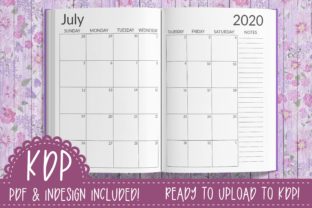
At its core, this is a pre-built planner interior designed for the school year running from July 2020 through June 2021. It includes both monthly and weekly spreads across 131 pages, all formatted at a standard 8.5x11 inch trim size with no bleed. That means you can upload it directly to KDP without worrying about complicated margin adjustments or cropping issues.
The package comes with two main files. First, a fully tested PDF of the lined journal interior that is ready to upload to Amazon. Second, an editable InDesign .indd file that gives you the freedom to customize fonts, colors, section headers, or any other design element before generating your own PDF. The typeface used throughout is Lato, a simple minimalist font that is free for commercial use. You will need to download it separately, but it is widely available and easy to install.
Because the planner is dated for a specific school year, it targets buyers looking for a functional, no-fuss organization tool. The monthly spreads give an overview of each month, while the weekly spreads allow for detailed day-by-day planning. This dual structure is familiar to anyone who has used a traditional academic planner, which makes it instantly usable for your customers.
Who This Planner Works Best For
The school-year calendar naturally appeals to several groups. Students from middle school through college often need a planner that starts in July or August rather than January. Teachers and educators also prefer a July-June timeline to align with the academic calendar. Parents, especially moms managing busy family schedules, find a dated planner helpful for tracking appointments, extracurricular activities, and school events.
Beyond personal use, this planner is designed for creators who want to sell on KDP. If you are building a low-content book business, you already know that interior files can take significant time to design from scratch. Having a ready-made template means you can focus on cover design, keyword research, and listing optimization instead of wrestling with layout software for hours. Even if you have never used Adobe InDesign before, the editable file is straightforward enough that you can make simple changes by following a few tutorials.
Practical Ways to Use the 20-21 Monthly Weekly Planner KDP
There are several realistic paths you can take with this template, depending on your comfort level and business goals.
Publish It as Is
If you want to launch quickly, the included PDF is already KDP-ready. You only need to create a cover that matches the interior size and theme. Upload the PDF, add your cover, write a clear product description, and you are live. This is the fastest route for beginners who want to test the planner market without investing too much time upfront.
Customize the InDesign File
If you have some design experience or are willing to learn, open the .indd file and make it your own. You could change the accent colors to match a specific niche, add motivational quotes, swap the font, or include extra pages such as goal trackers, habit logs, or note sections. Since the structure is already built, you save hours of grid work and can focus purely on styling.
Use It as a Lead Magnet or Bonus
This planner can also serve as a freebie to grow your email list or as a bonus for another product. For example, if you sell a course on KDP publishing, offering a ready-made planner interior as a bonus adds real value. Teachers or tutors might offer it to students as an organizational tool alongside their main curriculum materials.
Adapt for Multiple Niches
Because the design is minimalist, you can rebrand it for different audiences by simply changing the cover. A floral cover might appeal to moms and young women, while a geometric or solid color cover could suit professionals or students. The interior remains the same, but the cover lets you target distinct buyer personas without extra layout work.
Important Considerations Before You Publish
Before you rush to upload the 20-21 Monthly Weekly Planner KDP to Amazon, there are a few practical things to keep in mind.
Cover Design Is Not Included
The template comes with the interior only. You will need to create or purchase a separate cover design that matches the 8.5x11 inch trim size. This is standard in the KDP template world, but it is worth noting because a good cover heavily influences click-through rates. If you are not comfortable designing your own cover, you can hire a freelancer on platforms like Fiverr or Canva, or use KDP's cover creator tool for a simple solution.
Font Licensing
Lato is free for commercial use, which means you can include it in any product you sell without paying royalties. However, if you choose to swap the font in the InDesign file, double-check the license terms. Some popular fonts are free for personal use only and require a paid license for commercial products like KDP books.
Date Specificity
Because the planner is dated for July 2020 through June 2021, you are targeting a specific school year. This is not an undated or evergreen product. That is fine if you are publishing during or just before that period, but be aware that the window of relevance is limited. Some sellers choose to update the dates in the InDesign file and generate new versions for each academic year. Others use dated planners to build momentum during peak seasons and then transition to undated products for longer shelf life.
KDP Content Guidelines
Amazon has specific rules about low-content and no-content books. Planners are generally accepted, but your description and keywords must accurately represent the product. Avoid claiming that the planner is for "any year" if the dates are fixed. Also make sure your cover does not include trademarked terms or imagery without permission. Because the interior is clean and minimalist, you are unlikely to run into issues as long as your listing is honest.
Why a School-Year Planner Appeals to Back-to-School Shoppers
Back-to-school season is one of the strongest sales periods for planners. Parents and students are actively looking for organization tools to start the new academic year on the right foot. A dated planner that begins in July or August feels timely and relevant. Shoppers searching for "2020-2021 planner" or "school year planner" are likely to find this product if you optimize your listing with those terms in the title and description.
The clean and simple design works in your favor here. Many buyers prefer a minimalist layout because it does not distract from their own notes and priorities. The lined pages provide structure without being overly decorative, which appeals to people who want functionality over flash. This is especially true for college students and professionals who need a no-nonsense tool for managing deadlines, meetings, and study schedules.
Getting Started with the Template
If this is your first time working with an InDesign template, here is a simple workflow to follow:
- Download Lato font from Google Fonts or a trusted source and install it on your computer.
- Open the
.inddfile in Adobe InDesign. If you do not have InDesign, you can use the included PDF directly. - Make your edits such as changing colors, adding branding elements, or inserting extra pages.
- Export as PDF with the same trim size and no bleed settings.
- Test the PDF using KDP's online previewer to make sure everything looks correct.
- Create your cover using the dimensions for an 8.5x11 inch book.
- Write your listing with a clear title, bullet points, and description that highlight the school-year dates, monthly and weekly spreads, and the clean layout.
Even if you skip the customization step, the ready-made PDF removes the most time-consuming part of the process. This is especially helpful if you are just starting out and want to see how the KDP system works without a huge time investment.
Final Thoughts on the 20-21 Monthly Weekly Planner KDP
The 20-21 Monthly Weekly Planner KDP is a practical entry point for anyone building a low-content book business on Amazon. It gives you a fully functional interior that is already tested on the KDP platform, saving you the trouble of grid setup, margin calculations, and page numbering. The inclusion of both monthly and weekly spreads makes it useful for a wide range of buyers, and the school-year dates align with a high-demand shopping season.
Whether you choose to publish the PDF as is or customize the InDesign file to match your brand, this template offers flexibility without requiring advanced design skills. Just remember to plan for your cover separately, double-check font licenses if you make changes, and be honest about the dated nature of the planner in your product listing.
If you are looking to grow your KDP catalog with a clean, functional planner that appeals to students, teachers, and busy families, this template gives you a solid foundation to work from. With a little effort on the cover and listing side, you can turn it into a product that serves real organizational needs while building your publishing business one book at a time.